
ether.fi Cash is a Visa credit card that can use USDC or liquidUSD through Direct Pay, or let eligible users borrow against crypto collateral through Borrow Mode. It is available in many parts of the United States, but residents of 20 listed states are currently excluded and the Liquid Service is not available to U.S. residents. Eligible purchases can earn up to 3% cashback in USDC; the rate declines progressively based on membership tier, monthly spend, transaction currency, and merchant category.
What is ether.fi Cash?
ether.fi is a non-custodial staking and DeFi platform in the Ethereum ecosystem. Its products include staking, automated Liquid yield strategies, the Vault, and Cash. This guide focuses on Cash; staking and yield products have separate risks and terms.
ether.fi describes Cash as a non-custodial crypto credit card. Direct Pay spends eligible assets from the Vault, while Borrow Mode uses Vault assets as collateral and creates an interest-bearing balance with liquidation risk. The card is issued under separate terms by an issuing partner and is not the same product as the ether.fi protocol itself.
- Eligible purchases currently earn up to 3% cashback in USDC, with progressive monthly spend tiers.
- Cash supports Direct Pay and Borrow Mode, which have different funding, interest, and risk profiles.
- The Liquid Service is not available to U.S. residents, even where the Cash card itself is available.
- Identity verification is required before a Cash card can be issued or fiat services can be used.
- Free card allowances and standard virtual or physical card fees vary by membership tier and region.
- Cash supports Apple Pay and Google Pay, subject to issuer, device, regional, and merchant restrictions.
Is ether.fi Cash available in the United States?
Cash and fiat services are currently unavailable to residents of Arizona, Delaware, Georgia, Idaho, Louisiana, Maryland, Mississippi, Missouri, Montana, Nevada, New Mexico, North Dakota, Ohio, Oregon, Rhode Island, South Dakota, Tennessee, Vermont, Washington, and Wisconsin. U.S. applicants outside those states may still be subject to KYC, issuer review, and other eligibility checks. Separately, the Liquid Service is currently unavailable to U.S. residents. The restrictions can change, so verify them before applying or moving funds.
Enter your real country and state of residence, document-issuing country, residential address, and PEP status. Do not select Taiwan, “All countries except USA,” or any other option unless it truthfully applies to you; inconsistent information can delay or prevent approval.
Current restricted jurisdictions and eligibility notes: ether.fi availability guide
Card fees, foreign exchange, and cashback
The table summarizes the standard card charges and added foreign-exchange margin currently published by ether.fi. Dollar amounts are in USD. A listed card fee is not necessarily charged for every card because some tiers include free-card allowances and regional rules can differ.
| Membership tier | Included virtual cards | Included physical cards | Additional virtual card fee | Additional physical card fee | Added FX margin |
|---|---|---|---|---|---|
| Core | 1* | 0 | $10 | $50 | 0–0.5% |
| Luxe | 4 | 1 | $10 | $100 | 0–0.25% |
| Pinnacle | 10 | 2 | $10 | $100 | None |
| VIP | 50 | 2 | $0 | $0 | None |
The asterisk on Core's one included virtual card means the allowance may differ by region. For Core members, the official physical-card guide currently lists a $50 charge covering the card and shipping. Luxe, Pinnacle, and VIP can include free physical-card allowances; standard fees may apply after an allowance is used. Currency conversions also use the prevailing base FX rate, which ether.fi describes as approximately 1%, before any added margin shown in the table. Always confirm the final charge in the app before ordering or paying.
Included cards, additional-card fees, and account limits: ether.fi card and Vault limits
Current transaction limits, FX, and fees: ether.fi personal Cash card fees
How the up to 3% cashback works
Core, Luxe, and Pinnacle currently have publicly listed progressive tiers for standard USD purchases: 3% within each tier's first monthly spend range, 1% within the next range, and 0.5% above that range. VIP thresholds are not publicly listed. Cashback applies only to eligible, settled transactions and is credited as USDC.
| Membership tier | Monthly range at 3% | Monthly range at 1% | Rate above that range |
|---|---|---|---|
| Core | US$0–2,000 | US$2,001–3,000 | 0.5% |
| Luxe | US$0–10,000 | US$10,001–20,000 | 0.5% |
| Pinnacle | US$0–50,000 | US$50,001–80,000 | 0.5% |
| VIP | Not publicly listed | Not publicly listed | Not publicly listed |
The table shows the current standard USD thresholds. The separate EUR ladder and zero-added-FX benefit apply only when the merchant actually bills the card in EUR, and the EUR feature is currently in beta. They do not apply when a terminal uses Dynamic Currency Conversion (DCC) or the merchant converts the purchase and bills another currency. USD and EUR share one monthly spend counter, but each transaction is rated against its own currency ladder. Use the signed-in account terms for any unpublished VIP rules.
ATM withdrawals, cash advances, peer-to-peer payments, foreign-exchange services, taxes, gift cards, cash equivalents, investing and crypto purchases, real estate, account funding, and gambling are among the categories that do not earn cashback. Refunds and reversals can also reverse cashback already credited.
Current cashback tiers and excluded transactions: ether.fi cashback rules
Create an ether.fi account
Create an ether.fi account with an email address, verify the email, and then set up a passkey. Product interfaces change; if a button differs from the screenshot, follow the current on-screen instructions and official help center.
The following is this site's sponsored referral link. Before using it, confirm that your actual residence is eligible and provide only truthful KYC information. Only after a referred user registers through the link and reaches the currently required US$100 in eligible card spending may this site receive a USDC referral reward. Register with ether.fi · Official Affiliate Program rules
Open the ether.fi registration page and select Sign Up Today.

Choose Personal for an individual account; select Business only when it accurately matches the intended account use.

Enter an email address, review and accept the required terms, and select Continue.

Retrieve the six-digit verification code from your inbox and enter it on the verification page.

Set up a passkey when possible. If the screen offers Skip for now, you can postpone it and enable it later.

After signing in, open Cash from the member dashboard to see the cards currently available to your account.

Select Verify Your Account to begin KYC and card issuance.

Complete identity verification (KYC)
Cash cards and fiat services require identity verification. The process generally includes phone verification, a valid government-issued ID, a selfie and liveness check, residential details, a recent proof of address when requested, and an issuer compliance questionnaire. Incomplete or inconsistent information can delay or prevent approval.
Enter your real country and state of residence, document-issuing country, residential address, and PEP status. Do not select Taiwan, “All countries except USA,” or any other option unless it truthfully applies to you; inconsistent information can delay or prevent approval.
Answer the residence question truthfully. A U.S. resident must not select Taiwan simply because it appears in this legacy screenshot.

Set Country of residence to the country and state that match your current legal residence and official documents.

Review the verification requirements and select Start. The flow typically covers identity, a selfie, and personal information.

Use the United States verification path when it applies. Select All countries except USA only if you genuinely reside outside the United States.

Enter a phone number that can receive SMS messages and select Send verification code.

Enter the one-time SMS verification code.

Choose the actual issuing country and document type. Available documents depend on the current account flow.

Upload a clear, complete, uncropped image of a valid, unexpired identity document.

Complete the selfie and liveness check in good lighting, following the on-screen movement instructions.

Enter your legal name, birth details, and residential address exactly as supported by official documents.

Answer the compliance questions about occupation, source of funds, intended use, and expected activity truthfully.

Declare PEP status accurately. Select I am not a PEP only when that statement is true.

Wait for review after submitting the application. If documents are requested, respond only through the official app or support channel.

Official identity-verification process: ether.fi KYC requirements
Fund your Vault
After approval, open Add Funds in the Vault and fund it from a self-custody wallet, an exchange, or a generated deposit address. Supported assets and networks change, so use only the exact token-and-network pair displayed in your signed-in account.
Open the Vault and select Add Funds.

Choose an external-wallet transfer or Share your deposit address to generate a dedicated deposit address.

Copy the address or scan the QR code, then recheck the supported asset and network displayed on the deposit page.

When withdrawing from an exchange, the asset and network must exactly match the ether.fi deposit screen. Use the exchange's current fee quote.

Before sending, verify the asset, network, deposit address, and any minimum amount on both sides. Exchange withdrawal fees and blockchain gas fees are dynamic. Sending an asset on the wrong network can result in permanent loss, and on-chain transfers generally cannot be reversed.
Official crypto funding steps and safety notes: Fund Your Vault with Crypto
Official network-specific funding notice: USDT on Tron and USDC on Solana deposits
Liquid availability and reference steps
The Liquid Service is not available to U.S. residents. This section and its legacy screenshots are reference-only for readers who actually reside in a supported jurisdiction and whose signed-in account offers Liquid. Where available, Liquid allocates deposits across DeFi strategies and rebalances them automatically.
U.S. residents cannot use the Liquid Service. For an eligible resident of a supported jurisdiction, the reference flow begins by opening Earn from the Vault.

Where Liquid is legally available and offered in the account, compare eligible assets, current APY, fees, and risk details before selecting Deposit.

An eligible non-U.S. resident can enter the USDC amount, review the liquidUSD estimate and transaction details, and confirm only after accepting the current risks.

U.S. residents must not attempt to access Liquid by changing residence information or using a workaround. For eligible non-U.S. residents, the Market-Neutral USD name and roughly 10% APY in the screenshots are historical, not a return guarantee; Liquid also carries smart-contract, strategy, liquidity, and stablecoin risks.
Liquid strategy behavior, fees, regional availability, and risks: official ether.fi Liquid guide
How Direct Pay spends USDC and liquidUSD
Official Direct Pay rules currently list exactly USDC and liquidUSD. A purchase uses available USDC in the Vault first, then liquidUSD as the secondary spending asset when there is not enough USDC. The Liquid Service remains unavailable to U.S. residents, so this payment rule must not be treated as permission to access Liquid; the signed-in account controls which balance is actually available.
Differences between Direct Pay and Borrow Mode: ether.fi Cash payment modes
Borrow Mode interest and liquidation risk
Borrow Mode uses eligible Vault assets as collateral so the cardholder can spend without immediately selling those assets. As of this review, the published rate is 4% APY and interest begins compounding continuously as soon as a balance is borrowed, with no traditional billing cycle or interest-free grace period. A transaction refund is credited to the Vault main balance and does not automatically repay the loan, so repayment must be made manually. Falling collateral values can reduce account health and trigger liquidation. Rates and rules can change; check the latest app and official terms before borrowing.
Collateral, loan-to-value ratios, and liquidation risk: ether.fi collateral and borrowing guide
Mobile wallets and physical cards
Cash supports Apple Pay and Google Pay. Use the current Add to Wallet flow from the Cash card screen, and never enter a full card number, security code, or one-time code on an unofficial page.
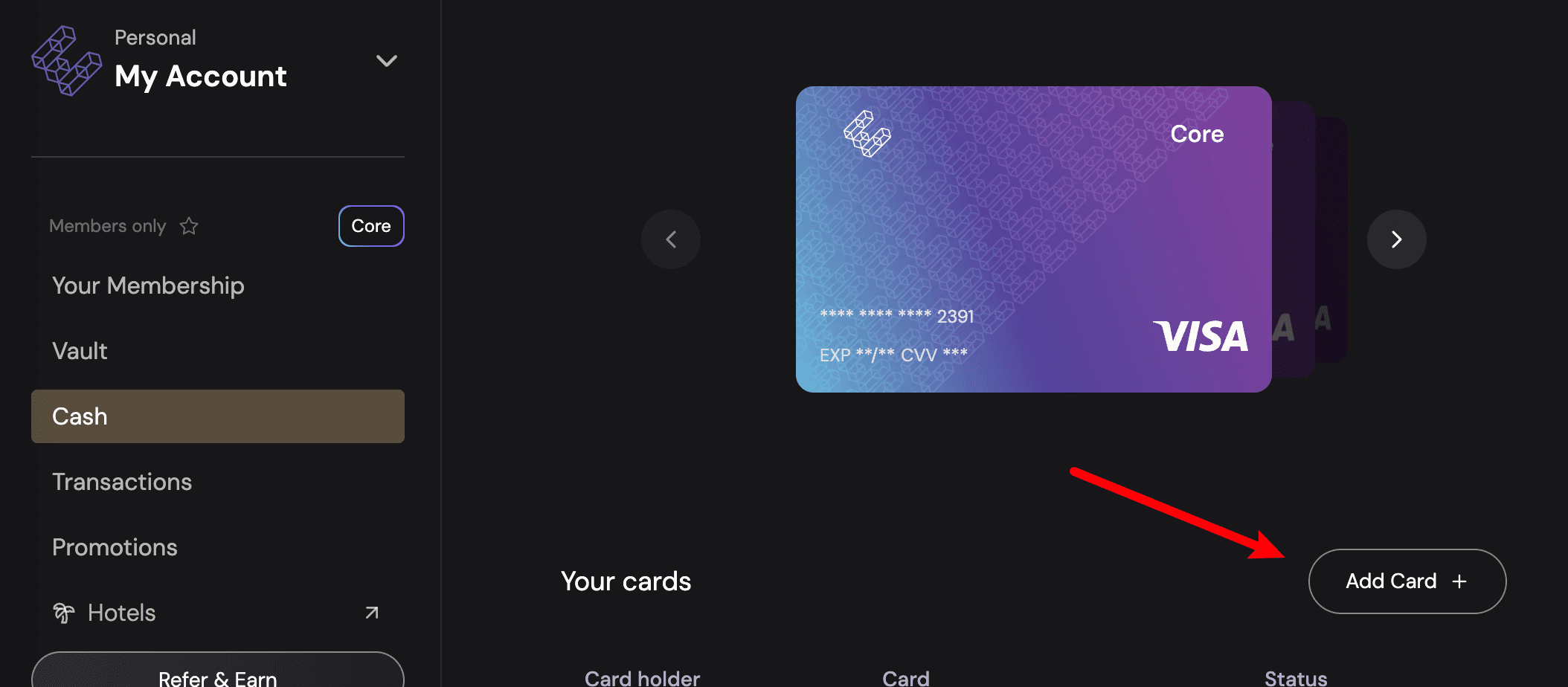
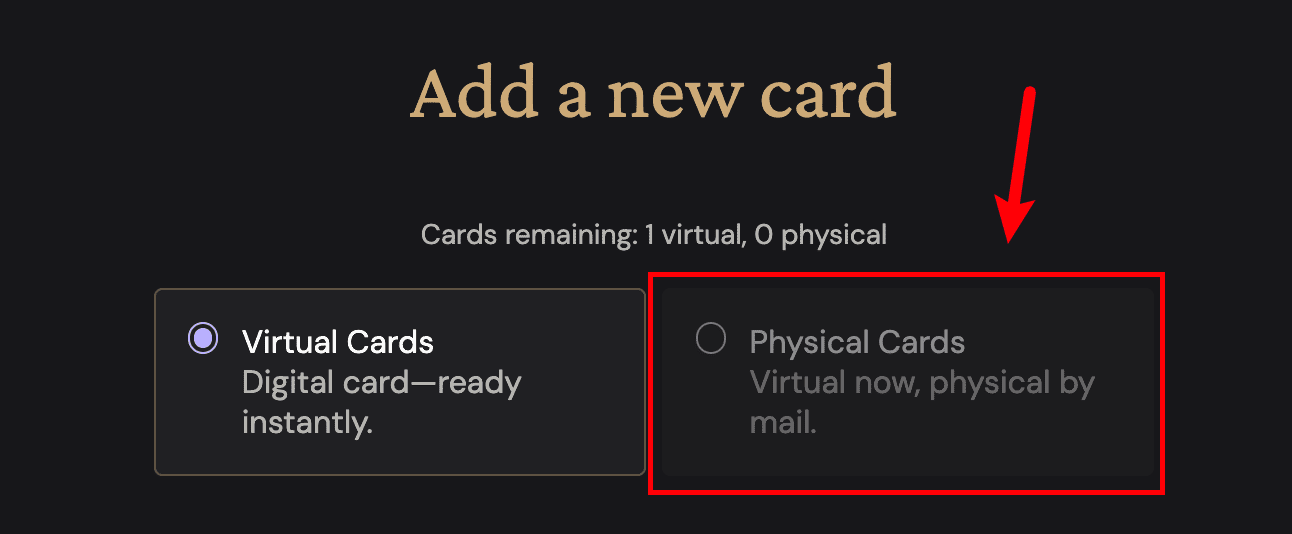
After KYC, open Cash, choose Add Card, and select Physical Cards. Physical-card shipping is offered in supported U.S. locations, but applicants in restricted states cannot use Cash. The Core physical card is currently listed at $50 and standard delivery is 15 or more business days; allowances, card materials, and delivery speeds vary by tier. Confirm the address carefully because it may not be editable after ordering.
Open Cash and select Add Card.
Choose Virtual Cards or Physical Cards and review the fee and free-card allowance shown for the account.
For a physical card, enter a deliverable address and check it again. After delivery, follow the app to activate the card and set its PIN.

Physical-card fees, shipping, and activation: ether.fi physical-card guide
Spend USDC or liquidUSD
In Direct Pay, ether.fi currently uses available USDC first and liquidUSD as a secondary spending asset. Some accounts or older interfaces may still show a manual spend-source selector. Borrow Mode instead creates a balance that starts accruing interest immediately and should not be treated as an interest-free credit-card grace period.
Open Cash or the Vault and review the current spending source, available balances, and Direct Pay settings.

If Select spend option is still available, choose USDC or liquidUSD. Newer rules may instead use USDC first and liquidUSD second automatically.

Where the card works and cashback exclusions
ether.fi states that Cash works wherever eligible Visa cards are accepted and supports Apple Pay and Google Pay. However, ATM withdrawals, cash advances, peer-to-peer payments, financial services, crypto purchases, gift cards, gambling, and several other merchant category codes do not qualify for cashback, and some transactions may be blocked entirely.
The Club points and membership tiers
The Club has Core, Luxe, Pinnacle, and VIP tiers. Everyone starts at Core and can earn Membership Points through eligible activity available in their jurisdiction, including Cash card spending. Points reset each calendar month. Current rules require 10,000 monthly points to unlock and maintain Luxe and 50,000 for Pinnacle; qualifying ETHFI holdings or staking may also unlock tiers under current terms. U.S. residents cannot use the unavailable Liquid Service to earn points.
Monthly point resets and tier behavior: ether.fi Membership Points System
Risks to review before applying
- Supported locations, issuer eligibility, free-card allowances, fees, and interfaces can change; recheck the official app before acting.
- Cashback applies only to settled, eligible transactions, and a refund or reversal can also reverse previously credited cashback.
- Borrow Mode charges interest immediately and creates collateral-value and liquidation risk; it has no traditional interest-free grace period.
- The Liquid Service is unavailable to U.S. residents; eligible non-U.S. users still face variable APY, smart-contract, strategy, liquidity, and stablecoin depeg risk.
- A transfer sent to the wrong address or network may be unrecoverable; verify every field and consider a small test transfer.
- Foreign exchange, refunds, ATMs, networks, and intermediaries can create additional costs; this article is not investment, tax, or legal advice.
Official sources
Product features and membership overview: official ether.fi Cash page
Frequently asked questions
Can U.S. residents apply for the ether.fi Cash card?
Many U.S. residents can apply, but Cash and fiat services are currently unavailable in 20 listed states. Applicants elsewhere must still complete KYC and pass issuer and compliance review. Check the latest official restricted-jurisdiction list before applying.
Is ether.fi Cash cashback always 3%?
No. The current program offers up to 3% on eligible purchases, then steps down progressively according to membership tier, monthly spend, and transaction currency. Excluded merchant categories receive no cashback.
How much does an ether.fi physical card cost?
The Core physical card is currently listed at $50. Higher tiers may include free physical-card allowances, while standard fees can apply to additional cards. Confirm the actual charge in the app before submitting the order.
Do I have to fund ether.fi Cash on Base?
No. Supported assets and networks can change and must be checked in Add Funds. If you choose USDC on Base, both the sending exchange or wallet and the ether.fi deposit screen must show that exact asset and network.
Can U.S. residents use ether.fi Liquid?
No. The Liquid Service is currently unavailable to U.S. residents. The Liquid section in this guide is reference-only for readers who actually reside in a supported jurisdiction and see the product in their signed-in account.